Inventory module
Know what you have before you sell it
Catalogs, warehouses, purchase orders, and stock movements—the operational layer cafés, restaurants, and retailers need before a single sale hits the register.
- Multi-warehouse stock & reorder alerts
- Purchase & sales order workflows
- One catalog for web, wholesale, and POS
Free to start · No credit card · Upgrade when you need more
Welcome back
Here's your finance snapshot
SKUs active
1,248
42 low stock
Stock value
AED 1.2M
+3.2% MoM
Open orders
36
12 PO · 24 SO
Revenue trend
6 moRecent activity
SO #1048 confirmed
24 units reserved
PO #882 received
Stock adjusted +120
Low stock alert
SKU-4412 below reorder
Included with Inventory
Finvora POS—where your inventory meets the customer
The POS app ships with Inventory, not as an add-on. Cafés, restaurants, and retail counters get a full-screen register; stock, categories, and availability all come from the same system that powers your back office.
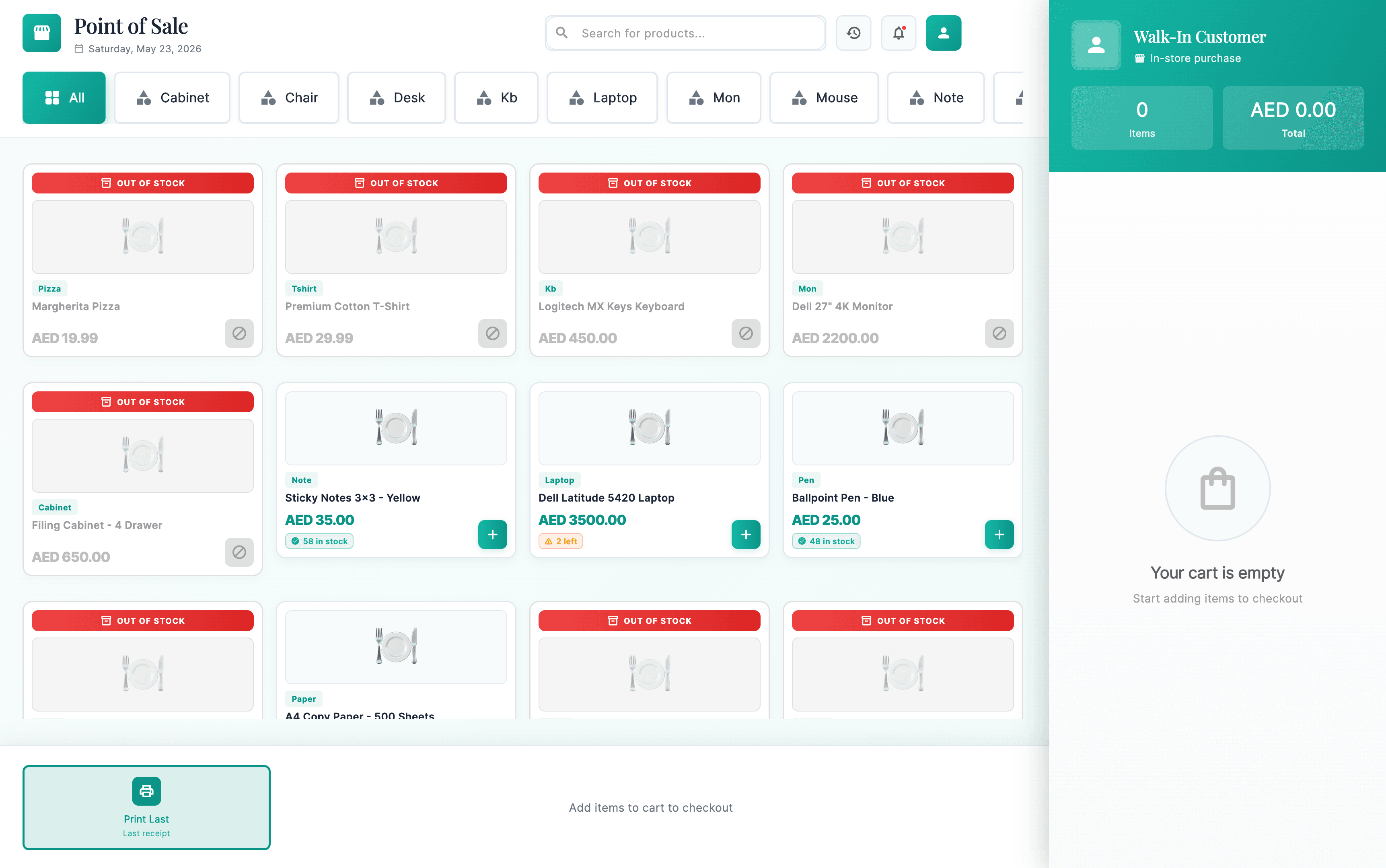
Stock on every product card
Registers show “58 in stock”, “3 left”, or “Out of stock” from Inventory—staff never sell what you don’t have.
Categories that match your business
From pizza and apparel to laptops and office supplies—one grid for mixed café, restaurant, and retail menus.
Checkout built for the floor
Cart, tips, discounts, tax, then Card, Cash, or UPI—fast payment flows without leaving the screen.
Why Inventory matters
POS without accurate stock is just a fast way to disappoint customers
That’s why we ship Inventory and POS together. Your team sets up products and warehouses once; registers, kiosks, and reports all read the same truth.
Catalog is the menu
SKUs, variants, barcodes, and categories in Inventory become the POS product grid—no duplicate product lists.
Warehouses & movements
Transfers, adjustments, and purchase receipts keep levels accurate before and after every shift.
Every sale updates stock
When the laptop or sticky notes sell at the till, on-hand quantity drops immediately—finance and ops see the same number.
Capabilities
Back-office stock operations
Everything that must be right before and after a sale—whether at the till, online, or wholesale.
Product catalog
SKUs, categories, barcodes, and variants—one source for POS, orders, and reports.
Multi-warehouse
Levels and transfers across stores, kitchens, and back rooms.
Stock movements
Adjustments, receipts, and audit trail for every change.
Purchase orders
Buy from suppliers and receive stock before bestsellers run out.
Sales & fulfillment
Reserve and ship stock with the same quantities your POS displays.
POS included
Counter register app ships with Inventory—see the live UI preview above.
Workflow
Stock in three moves
Set up once, sell with confidence, replenish with data.
Set up catalog & locations
Products, warehouses, and suppliers in one place.
Sell with live levels
POS and orders pull the same availability—you see “3 left” before it’s gone.
Receive, adjust, report
POs, transfers, and movement history for managers and finance.